



Corporate travel looks simple on the surface—book flights, reserve hotels, approve expenses. But behind the scenes, it’s a constant balancing act between cost control, employee experience, policy compliance, and real-time decision-making.
If your current process involves scattered emails, multiple booking platforms, and manual approvals, you’re not alone. Many companies still operate this way—and it costs them time, money, and visibility.
This is exactly where travel desk software changes the game.
In this guide, you’ll learn what travel desk software is, how it works, key features to look for, and how to choose the right solution for your business.
What Is Travel Desk Software?
Travel desk software is a centralized platform that helps businesses manage all aspects of corporate travel—from booking and approvals to expense tracking and reporting.
Instead of relying on manual coordination or disconnected tools, it brings everything into one streamlined system.
In simple terms, it helps you:
- Book flights, hotels, and transport in one place
- Automate approval workflows
- Enforce travel policies
- Track travel spend in real time
- Support employees during trips
Think of it as the control center for your company’s travel operations.
Why Businesses Need Travel Desk Software
Managing corporate travel manually may work for small teams, but it quickly becomes inefficient as your company grows.
Common challenges without a proper system:
- Lack of visibility into travel spend
- Policy violations and uncontrolled bookings
- Time-consuming approval processes
- Difficulty tracking employees during travel
- Poor traveler experience
Travel desk software addresses all of these challenges by introducing structure,automation, and data-driven insights.

Key Features of Travel Desk Software
Not all solutions are created equal. The best platforms combine usability with powerful functionality.
1. Centralized Booking System
Employees can search and book flights, hotels, and cabs from a single dashboard.
Benefits:
- Saves time
- Ensures consistency
- Reduces dependency on multiple vendors
2. Automated Approval Workflows
Approvals can be configured based on role, budget, or travel type.
Example:
- Junior employees require manager approval
- CXO-level bookings auto-approved
This eliminates delays and keeps travel moving smoothly.
3. Travel Policy Enforcement
The software ensures that every booking aligns with company policy.
It can:
- Restrict premium bookings
- Set budget limits
- Flag non-compliant options
This keeps costs under control without constant manual checks.
4. Real-Time Expense Tracking
Track every rupee spent on travel as it happens.
Why it matters:
- Better budgeting
- Accurate financial reporting
- No surprises at month-end
5. Reporting and Analytics
Detailed dashboards give insights into travel patterns and spending.
Key metrics include:
- Total travel spend
- Department-wise expenses
- Vendor performance
- Cost-saving opportunities
Benefits of Using Travel Desk Software
1. Cost Optimization
Companies often overspend on travel due to lack of visibility and control.
With travel desk software, you can:
- Identify unnecessary expenses
- Choose cost-effective options
- Negotiate better vendor deals
2. Improved Employee Experience
A smooth travel process directly impacts employee satisfaction.
With the right software:
- Booking becomes faster
- Approvals are quicker
- Support is always available
3. Increased Efficiency
Manual processes slow everything down.
Automation helps:
- Reduce administrative workload
- Eliminate repetitive tasks
- Speed up decision-making
4. Better Compliance
Policy violations can quietly drain budgets.
Travel desk software ensures:
- Every booking follows rules
- Exceptions are tracked
- Audit trails are maintained
5. Data-Driven Decisions
Instead of guessing, you rely on real data.
This helps in:
- Budget planning
- Vendor selection
- Travel strategy improvements
How Travel Desk Software Works
Understanding the workflow helps you see its real value.
Step-by-step process:
- Employee raises a travel request
- System checks policy compliance
- Approval workflow is triggered
- Booking options are displayed
- Employee selects preferred option
- Booking is confirmed within the system
- Expenses are automatically tracked
- Reports are generated for analysis
Everything happens within one platform—no back-and-forth emails or spreadsheets.
Who Should Use Travel Desk Software?
Travel desk software is useful across industries and company sizes.
Ideal for:
- Startups scaling their operations
- SMEs managing frequent business travel
- Enterprises with complex travel policies
- Companies with remote or distributed teams
If your organization spends regularly on travel, you need a structured system.
How to Choose the Right Travel Desk Software
Not every tool will fit your needs. Here’s how to evaluate your options.
1. Ease of Use
The platform should be intuitive for both employees and admins.
2. Customization
Your travel policies and workflows should be configurable.
3. Integration Capabilities
Look for integration with:
- Accounting systems
- HR platforms
- Expense management tools
4. Real-Time Data Access
Ensure dashboards and reports update instantly.
5. Customer Support
Reliable support is critical during travel disruptions.
6. Scalability
Choose a solution that grows with your business.

Travel Desk Software vs Traditional Travel Management
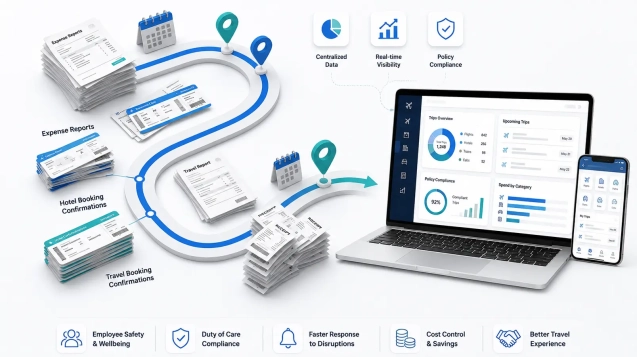
Traditional travel management relies heavily on manual coordination, emails, and multiple booking platforms. This often leads to delays, lack of visibility, and inconsistent policy enforcement.
In contrast, travel desk software centralizes bookings, automates approvals, tracks expenses in real time, and enforces policies automatically. It also provides advanced reporting, helping businesses make informed decisions and maintain full control over travel operations.
Trends Shaping Travel Desk Software
Corporate travel is evolving, and software is keeping up.
1. AI-Powered Recommendations
Smart systems suggest cost-effective and policy-compliant options.
2. Mobile-First Platforms
Employees can manage travel on the go.
3. Real-Time Pricing Integration
Dynamic pricing ensures the best deals at the moment of booking.
Frequently Asked Questions (FAQ)
What is travel desk software used for?
Travel desk software is used to manage corporate travel bookings, approvals, expenses, and reporting in one centralized system.
How does travel desk software reduce costs?
It enforces travel policies, provides real-time pricing, and offers insights into spending patterns, helping businesses avoid unnecessary expenses.
Is travel desk software suitable for small businesses?
Yes. Even small teams benefit from automation, better cost control, and improved efficiency.
Can travel desk software integrate with accounting tools?
Most modern platforms offer integrations with accounting, HR, and expense management systems.
What features should I prioritize?
Focus on:
- Ease of use
- Policy enforcement
- Real-time reporting
How secure is travel desk software?
Reputable platforms use enterprise-grade security, including data encryption and access controls.
Final Thoughts
Corporate travel doesn’t have to be chaotic or expensive. With the right travel desk software, you can transform a fragmented process into a streamlined, data-driven operation.
The real advantage isn’t just automation—it’s clarity. You gain control over spending, improve employee experience, and make smarter decisions backed by real insights.
If your organization is ready to make business travel smarter, more flexible, and more cost-effective, it may be time to upgrade your travel desk software.
Book a demo with AtYourPrice today and discover how modern travel desk software can help you control costs, improve policy compliance, and deliver a smoother travel experience for every employee.